
December makes New Zealand workplaces busier, with more staff, visitors, and temporary workers on site. Extra movement can create security challenges for managers. Using swipe card access control helps keep buildings secure and makes access easier to manage.
In this setting, swipe card access control replaces traditional keys. It allows managers to control who enters each area, keeps clear access records, and lowers costs from lost keys and rekeying. This blog explains what it is, how it works, typical costs, and where it delivers real value for daily operations and long-term planning.

What Is Swipe Card Access Control?
Access becomes smarter when doors respond to cards or fobs rather than keys. Managers can monitor entries, update permissions, and enhance security with ease.
A Simple Definition In Everyday Terms
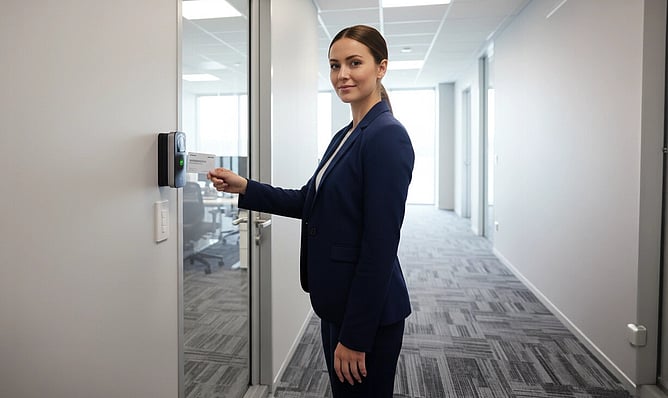
Swipe card access control allows a person to open a door or gate by presenting a card or fob to a reader. When a user presents a credential, the system checks permission and unlocks the door if access is allowed. Businesses gain more control compared with traditional lock-and-key systems.
Cards can be cancelled or updated using software without replacing the lock. Reprogramming saves time and reduces costs when staff roles change or credentials go missing. Managing access becomes much simpler over time.
Components of Swipe Card Systems
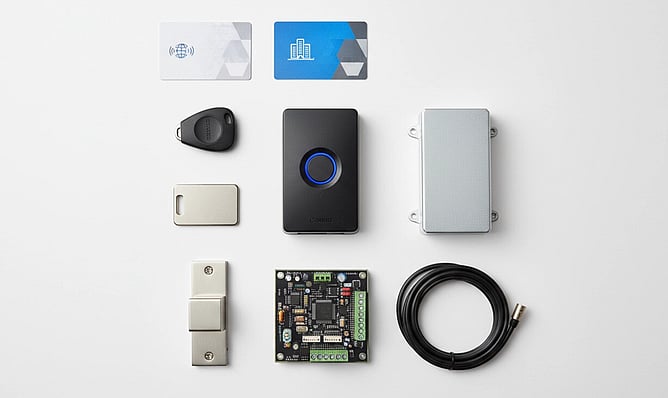
Most swipe card access control systems use a few key parts. Each part has a specific role, and the system works best when it fits the building and security needs.
Credentials: Cards, proximity cards, or key fobs used to identify users.
Door Readers: Devices that read the credentials and send the information to the controller.
Controllers or Panels: The central unit that verifies access and triggers locks.
Electronic Locks and Hardware: Magnetic locks, strikes, or motorised gates that secure doors.
Software Platform: Tracks users, manages schedules, and keeps logs for audits and reporting.
How Swipe Card Access Control Systems Work
Doors unlock quickly as the system verifies credentials in the background. Only authorised users can gain access, keeping the site secure and under control.
Step-By-Step Door Access Process
A typical access event takes only seconds, but multiple security checks happen in the background. The steps below show the standard flow for commercial swipe card access control systems:
Users place a swipe or proximity card near the reader.
Encrypted data from the card is sent directly to the controller.
Permissions are checked against access rules, including user identity, door, and time.
Authorisation triggers the electronic lock to open the door.
Each entry is recorded in the system for auditing and review.
Site managers can update access rules instantly. Permissions can be adjusted for shifts, roles, or temporary projects without issuing new keys each time.
Cost Comparison: Swipe Cards and Keys
Access control choices influence both security and everyday running costs. Understanding where expenses arise helps businesses plan efficiently and achieve long-term savings.
Key System Expenses
Traditional keys may appear inexpensive at first, but ongoing management often becomes costly. Problems with keys frequently occur at inconvenient times, creating stress and unexpected expenses.
Rekeying locks when staff leave
Calling a locksmith for lost or broken keys
Replacing cylinders or damaged door hardware
Extra administration and downtime on sites with multiple doors
Smarter Cost Curve With Cards
Swipe card access control simplifies management while reducing unexpected costs. Cards can be updated instantly, helping sites stay secure without repeated hardware changes.
Disable cards in seconds when staff leave
No lock replacement required
New starters gain access immediately
Temporary workers receive time-limited access automatically
Main Factors Driving Swipe Card Costs
Pricing for a swipe card access control system varies depending on site setup and requirements. Planning ahead helps businesses manage costs and avoid unexpected expenses.
What You Can Control
System design has a bigger impact on pricing than the cards themselves. In New Zealand, several elements commonly affect costs:
Number of Doors and Sites: More doors require additional readers, controllers, and cabling.
Reader Type: Basic swipe readers are more affordable than multi-technology readers that also support mobile access.
Hosting Method: On-site servers suit some locations, while cloud-based systems reduce the need for local hardware.
System Integration: Connecting CCTV, alarms, or intercoms increases setup time and labour.
Security Level: High-risk areas may need stronger locks, duress features, or specialised visitor management.
Typical Ballparks For Common Setups
Costs vary by site and door condition. These ranges reflect typical NZ projects and international benchmarks:
Single Door or Small Office: Often a few thousand dollars, including cabling, locks, and installation. Simple doors sit at the lower end, while complex doors increase the cost.
Multi-Door or Multi-Site: Can reach tens of thousands for warehouses, schools, retail chains, or council sites, particularly where advanced integration or strict compliance is needed.
Door condition also affects cost. Existing solid doors cost less to upgrade than doors needing a new frame, power supply, or fire rating review.
Ongoing Costs Worth Planning
A swipe card system is an ongoing investment. Plan for these predictable costs:
Replace cards or key fobs for new staff or lost items
Pay for software licences or cloud subscriptions
Schedule maintenance visits for hardware checks, battery backups, and updates
Update users, add doors, or tweak integrations as needed
Many NZ businesses choose fixed-cost maintenance plans to keep expenses predictable and simplify budgeting.
Key Benefits For NZ Businesses
Investing in a swipe card access control system improves security and efficiency. Businesses gain better control over who can enter each area while keeping daily access simple for staff.
Stronger Security With Less Loss
One of the main benefits of swipe card access control is the ability to block access straight away. Cards that are lost or stolen can be disabled without replacing locks, keeping areas such as stock rooms, server cupboards, or medicine storage secure. Encryption makes copying or tampering with credentials much more difficult than with traditional keys.
Permissions can be set according to job roles, so only authorised staff can enter high-risk areas. Managers gain better oversight without constant manual checks. Security strengthens across the site while the risk of theft and losses is reduced.
Easier Daily Access For Staff
Cards and fobs make moving around the workplace much simpler for employees. Heavy key rings are no longer needed, and access can be set to match each person's role. Timed schedules allow cleaning staff in after hours, restrict entry during holidays, and manage contractor access without extra supervision.
Linking access cards to ID or attendance systems cuts down on paperwork. Managers can quickly monitor who is on site and when. Staff enjoy smooth and efficient entry throughout the day.
Logs That Support Compliance
Electronic logs record who entered which door and at what time. Incident investigations, HR reviews, and regulatory reporting become much easier to manage. Accurate records also support broader security systems access control strategies.
Visitor management and site oversight improve with precise logs. Restricted areas remain documented during fire drills, stocktakes, or sensitive client visits. Organisations strengthen accountability while maintaining compliance standards.
Modern Access Options For Workplaces
Workplaces need flexible and secure ways to control access. Modern systems make it easier to manage staff, contractors, and visitors efficiently.
Physical Cards Remain Practical
Physical cards and fobs stay popular because they are affordable and easy to replace. Mixed-age staff or shared roles often require cards as the main credential. Swipe card access control systems remain a reliable choice for many New Zealand sites.
Cards work well in challenging environments such as cold storage or industrial yards. Staff can access doors safely without handling phones. High reliability keeps cards widely used despite new technology options.
Mobile Access Adds Flexibility
Mobile credentials allow smartphones to function as secure entry passes, reducing reliance on physical cards. They are especially helpful for sites with mobile or temporary staff.
Remote access for instant entry
Temporary passes for visitors or contractors
Smooth entry without a crowded reception
Managers can track access and change permissions
Convenient and secure
A Hybrid Mix Often Works Best
Many workplaces combine different types of credentials to suit user needs. Staff may carry cards, managers use mobile passes, and visitors receive temporary fobs. Access is assigned according to the risk level of each area.
Upgrades can focus on high-risk doors first while standard areas continue with existing cards. Mobile access can be added gradually as needs change. A hybrid system gives security and flexibility without replacing the full setup.
Managing Access Control Across Sites
Organisations across New Zealand rely on professional support for access control in a variety of environments:
Offices and retail outlets
Warehouses and industrial facilities
Schools and educational campuses
Government buildings and social housing projects
Different sites have different needs. Schools may focus on pupil safety and visitor management, while logistics depots often prioritise perimeter security and shift-based access.
Linking Access To Complete Security
Access control works best when connected to a complete security system. Electronic locks, CCTV, alarms, intercoms, and portable solutions allow managers to oversee the entire site from a single platform. Door events are logged, alerts are sent automatically, and reports give clear insights into access activity.
Layered systems close security gaps and strengthen protection across the site. Each component supports the others, creating a reliable defence for all areas. Organisations gain a coordinated and efficient way to manage access while safeguarding assets.
Boost Security With Smarter Access
Modern access systems simplify management during busy periods and staff changes. Swipe card access control allows quick door control, smooth onboarding, and accurate tracking of site activity. Eliminating ongoing costs linked to traditional keys makes the system efficient and cost-effective.
Hybrid setups combining cards, mobile credentials, and flexible access increase security across the site. Careful planning improves both protection and day-to-day operations. Expert support and integrated technology ensure New Zealand workplaces implement the system effectively.
Frequently Asked Questions
Businesses often look for simple, reliable ways to manage access. Understanding how swipe card systems operate can improve security and streamline daily routines.
What Is Swipe Card Access Control And How Does It Work?
Staff use a card or fob to open doors electronically. Readers scan the credentials, the system checks access rights, and doors unlock when permission matches. Each entry is logged for security and review.
Are Swipe Card Access Control Systems More Secure Than Keys?
Card systems give stronger security compared with traditional keys. Lost or stolen cards can be blocked immediately. Encryption and access rules make copying difficult, while logs track all entries.
What Benefits Matter Most For Business?
Businesses control who enters restricted areas and reduce administrative work. Access records make audits and investigations easier. Operations run more smoothly, and overall security improves.